
I’ve had my iPhone 6s (Space Gray, 64GB) for a month, and John Gruber was right in his review: “For a typical iPhone user on a two-year upgrade cycle, I think the S years are the better phones, historically… New-number iPhones (4, 5, 6) are about showing off Apple’s design prowess. The S models are about showing off Apple’s engineering prowess.”
I missed the 5s, hopping straight from an iPhone 5 to an iPhone 6 in 2014. And even taking into account the jump in size and performance a year ago, this feels more significant. The performance improvements are anything but subtle. This is a much, much better device than the iPhone 6.
Touch ID is now practically instant (and often, if you just want to see your lock screen, frustratingly so!). The camera is the best there is. And the 2GB of RAM is a badly needed doubling of memory (no more never-ending reloading of tabs in Safari). But, this is not a review. There are many great ones including Gruber’s on Daring Fireball, Nilay Patel’s on The Verge and Serenity Caldwell’s on iMore.
The only thing that’s changed is everything. A cute tagline from Apple. But completely apt.
From a user point of view, the selling points in Apple’s 60 second advertisement are a new colour (Rose Gold!), improvements to Siri, Live Photos, the new app switcher (huh?!) and 3D Touch.
And it’s this feature that dominates… how you use it and use-cases related to it are practically half the ad. But its deliberately not mentioned by name (which normal consumer is going to a) remember that name, and b) know what it means?). Rather, the iPhone now “responds to the pressure of your finger”. You can “peek into stuff”, “pop stuff open” (and it lists mails, messages, news as places this would be useful)… “Even selfies have changed”.
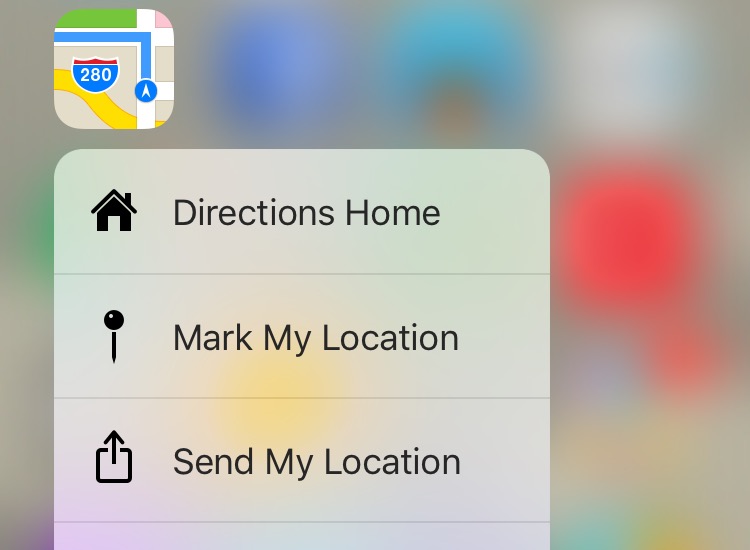
Selfies and the Quick Action menu now available on the Camera app are one (clever) way of getting people to use 3D Touch (and forcing a change in habit).
Quick Actions sounds very useful – in theory. And I tried to force myself to use them in the first week. In a similar way to apps which do one thing being useful on the Watch, shortcuts via a Quick Action menu to one thing you do regularly when you launch an app are the most useful. Think taking a selfie with the camera. Or ‘Shazam Now’ for an app that really only has that use (despite all the different things they are trying).
One way of thinking about these are that they’re menus for power users, in that any shortcuts they contain will help those who know about it navigate more quickly and easily, but a typical user isn’t really disadvantaged and can continue using their apps in the ‘normal’ way.
For a while I found myself deliberately using the Quick Action menus. The novelty wears off pretty quickly, though…
I found peeking and popping less useful. Beyond that, it’s also much more difficult to break the habit of tapping into things.
By hard-pressing the left edge of the screen and swiping, you’re able to launch the last app you were using (pressing and swiping slightly launches the app switcher). This is a useful shortcut, but again, at this point our brains are hardwired to double-tap the home button.
And the fourth use of 3D Touch allows you to turn your on-screen keyboard into a Trackpad by hard-pressing on it. This is incredibly handy when you’re trying to edit something you’ve typed (remember those situations where you’re trying to finesse the cursor to the position you want it and you never quite get it there?). But, it’s not obvious that this feature even exists. I forgot about it (the keynote was a while ago!), and a friend told me about it.
Developers have (rightfully?) rushed to implement Quick Action menus on their apps, in an almost tick-box way. Some Quick Action menus are useful. Some are not. Some apps have them. Some don’t. Some have shortcuts to app features that I’ve never used (and I cannot fathom why they’d be on the menu in the first place). Is simply having a Quick Action menu enough? Probably not. Is it better to have one than not have one? Possibly?
Within third-party apps, the implementation of peeking and popping is practically non-existent. I can only find two non-Apple apps on my device (Tweetbot and WhatsApp) where hard-pressing let’s me peek into or pop into something. Maybe I need more apps? But even in Apple’s apps which I use all the time, I simply don’t find myself hard-pressing all over the place.
This inconsistent implementation is a big barrier to adoption. Which is a pity, given how powerful this interaction method can (will?) be. And the average user – who is already used to how to navigate and use things – is not exactly going to be exploring every app on their iPhone 6s (or 6s Plus), trying to hard-press on things.
Conceptually, we could see the emergence of entirely new ways to interact with on-screen elements and to navigate within apps. Games are an obvious category where this new dimension of interaction has significant promise. We could see as fundamental a change as pinch to zoom triggered. We haven’t yet.
Developers are still playing it safe… apps have menus (typically found in the same place), interactive elements invite touch (/tapping), and navigation hierarchy (and how you traverse certain layers within apps) is pretty standard.
I’m not suggesting we throw established user interface guidelines (or should that be Human Interface Guidelines?) out the window, but up to now, the implementation of 3D Touch enabled-interaction seems superficial (and perhaps too shallow or even literal).
Random thought: What if a hamburger menu provided the basic menu with a normal tap, and instead of needing to tap ‘More’ to see an expanded menu, hard-pressing the hamburger icon did that?
There’s a new way of interacting with apps that is waiting to be invented.
Then again, forcing a change in habit is a big ask. We know to tap. We (mostly) know to double-tap. We know to pinch-to-zoom. There’s comfort in sticking with the existing paradigm.
I keep wondering whether my mom or those of my friends who are perpetually at least one version of iOS behind will actually ever use 3D Touch.
I’m not (yet) convinced.
* Hilton Tarrant is client engagement lead at immedia.